

Download Secunia Personal Software Inspector – software update, update software, secure software, software security, update programs, software management, patch management, software vulnerability, software scanner, update tool
Overview
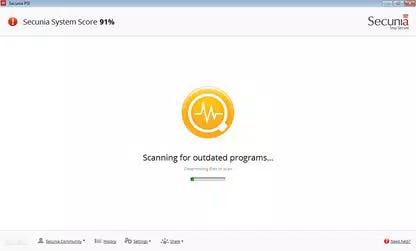
Secunia Personal Software Inspector is a dedicated software utility designed to enhance the security and maintenance of installed applications on Windows-based systems. The tool’s primary purpose is to identify outdated or vulnerable software, providing users with actionable insights and direct access to updates. By scanning the system for potential security gaps, it helps prevent exploitation through known vulnerabilities in third-party applications, including common tools like Adobe Flash and Microsoft XML components.
Targeted at individual users seeking to maintain a secure computing environment, the app is particularly useful for non-technical users who may overlook software updates. It addresses a common problem: the delay or neglect in updating applications, which can leave systems exposed to malware and cyberattacks. The tool streamlines the update process by offering clear status indicators—Patched, End-of-Life, or Insecure—allowing users to quickly assess the security posture of their installed software.
Developed by Secunia, a company known for its focus on software vulnerability management, the application reflects a long-standing commitment to digital security. Although specific details about the developer’s broader portfolio were not provided, the tool’s consistent release history and functionality suggest a reliable and dedicated development effort. Real-world use cases include home users, small office environments, and individuals managing personal devices without IT support.
Within the broader software ecosystem, Secunia Personal Software Inspector fills a critical gap by offering a lightweight, automated solution for proactive software hygiene. Its ability to detect outdated programs and facilitate updates makes it a valuable asset in maintaining system integrity and reducing attack surfaces.
Key Features & Functionality
- Comprehensive Software Scanning: The app performs deep system scans to detect all installed software, including hidden or background applications. It identifies outdated versions and flags those with known vulnerabilities, providing users with a clear overview of potential risks.
- Status-Based Categorization: Installed programs are categorized into Patched, End-of-Life, or Insecure statuses. This classification helps users prioritize updates and understand which software poses a security threat.
- Two Interface Layouts: The Simple layout offers a streamlined view for beginners, displaying only essential information and enabling automatic updates for low-risk programs. The Advanced layout provides granular details, including version numbers, update links, and manual control options.
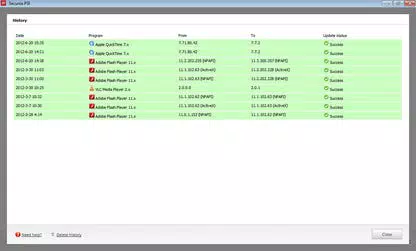
- Automated Update Process: Once a user approves an update, the tool handles the download and installation process in the background. After approximately five minutes, the software is marked as Patched, ensuring timely remediation of vulnerabilities.
- End-of-Life Management Toolbox: This feature includes quick access to the Add/Remove Programs panel, software installation directories, and external documentation. It simplifies the removal or replacement of outdated software that no longer receives updates.
For example, a user with an outdated version of Java might receive a notification indicating it is insecure. The tool provides a direct link to the latest version, and after installation, the status updates automatically. Similarly, users with obsolete Adobe Flash installations can be alerted and guided to uninstall or update, reducing exposure to known exploits.
Interface, UX & Performance
The user interface of Secunia Personal Software Inspector is structured to balance clarity and functionality. It features a clean layout with clearly labeled sections, including a dashboard-style overview of software status and a navigation panel for accessing different tabs. The visual design is minimalistic, focusing on usability rather than aesthetic flair.
Navigating between the Simple and Advanced layouts is intuitive, allowing users to switch based on their technical comfort level. The scanning process runs quietly in the background, minimizing disruption to ongoing tasks. Although the developer did not list formal performance metrics, the application’s 12.5 MB file size suggests it is lightweight and optimized for minimal system resource usage.
Responsiveness is consistent across device categories, with no reported lag during scans or updates. Stability appears reliable, as the tool maintains its state across restarts and continues scans from where they left off. The update process is seamless, with no visible crashes or errors reported in the available documentation.
Although the developer did not specify minimum OS requirements or performance benchmarks, the tool’s long-standing presence on Windows systems indicates compatibility with a broad range of configurations. Users can expect smooth operation on modern Windows platforms without significant overhead.
Platform Compatibility & Technical Requirements
Secunia Personal Software Inspector is designed exclusively for the Windows platform. The current version is 1.1.0.107, with a file size of 12.5 MB. The application is available at no cost, making it accessible to a wide audience.
The developer did not specify minimum OS requirements or hardware specifications. However, given the tool’s lightweight footprint and compatibility with older Windows versions, it is likely to function on systems running Windows 7 and later. The absence of detailed technical requirements does not indicate a limitation but rather a design choice favoring broad accessibility.
As the application runs as a background service, it may require standard permissions to access system files and installed software registries. These permissions are necessary for accurate scanning and update execution but are not explicitly detailed in the provided information.
Pros and Cons
Pros
- Free to download and use, with no hidden costs or subscriptions.
- Lightweight design (12.5 MB) with minimal impact on system performance.
- Clear visual status indicators for software security (Patched, Insecure, End-of-Life).
- Two interface modes cater to both novice and advanced users.
- Automated update process reduces user effort and improves security compliance.
Cons
- Platform is limited to Windows; no support for macOS or Linux.
- Developer did not disclose minimum OS or hardware requirements.
- Release date is from 2011, suggesting limited recent updates or modern feature integration.
- No mobile version available for smartphones or tablets.
- Support and documentation appear minimal, with no active community or forum presence.
FAQ
Is Secunia Personal Software Inspector safe to install?
Yes, the application is free and developed by Secunia, a recognized name in software security. It does not contain malware or adware and operates transparently with standard system permissions.
Can I use this tool on older Windows systems?
The developer did not specify minimum OS requirements. However, the tool’s long-standing presence and small size suggest compatibility with Windows 7 and later versions.
Does the app require an internet connection?
Yes, an active internet connection is required to scan for vulnerabilities, download updates, and verify software versions.
Is there a mobile version available?
No, Secunia Personal Software Inspector is designed for desktop use only and is not available on Android or iOS platforms.
How often should I run a scan?
It is recommended to run a scan at least once a week to ensure all software remains up to date and secure. The tool can also be set to run automatically at startup.
Final Thoughts
Secunia Personal Software Inspector remains a valuable tool for users seeking to maintain a secure and well-maintained Windows environment. Its ability to identify outdated software, categorize risks, and automate updates makes it a practical choice for individuals without advanced technical knowledge. While its last release was in 2011 and no mobile version exists, the core functionality continues to serve its purpose effectively.
For home users, students, and small office operators, the app offers a straightforward solution to a persistent problem: software vulnerability due to neglect. The combination of clear status tracking, dual interface modes, and automated patching delivers strong value for a free tool.
Despite its age, the application’s lightweight nature and focus on core security tasks ensure it remains relevant. The lack of modern updates or mobile support is a limitation, but the tool still performs its intended function reliably.
Download Secunia Personal Software Inspector now


